Monday, December 2, 2013

Assignment #10- Website Creation

A personalized website can be a powerful tool for a teacher.  Anyone can make a website these days.  There are many online tools to create websites.

I have used weebly and googlesites to create websites for school purposes.  I invested a lot of time to figure out how to make a website with weebly.  I created and manage the Ta'iala Academy website.  

I recently started a class website on googlesites with my small homeschool group.  It's still a work in progress since we just started it last week, and we've had the holiday break.  But it will showcase the work we've done in our Renewable Energy unit.

Like lesson preparation, website design is something that is "never done".  So I know I can improve my work, when I have the time.

Monday, November 18, 2013

Assignment #9 - Learning Management Systems

-Create a page with an overview of the assignment, at least different 3 links, and a task that students complete to demonstrate their knowledge- you can do more if you want of course!
-Post link to your blog with a reflection of how you might use this as a tool in your class or learning environment

***********************

A Learning Management System (LMS) is a software application for the administration, documentation, tracking, reporting and delivery of e-learning education courses or training programs.[1]

I have been using a Learning Management System  with the homeschool class I am teaching with my niece and nephew, and it has been a great help!  My own daughter's teacher uses a Wikispace with her class.  When I saw the function of that online space, I decided I would like to try it out for my class.  Because we don't have a formal classroom where I can post student work on the wall or write on the whiteboard, I have had to find ways to adapt the methods I would normally use in a traditional classroom situation.  The Wikispace provides a "location" where I can organize and administer class objectives, assignments, and discussions.

Some things I love about using a LMS:
  • Endless Resources - When I'm doing lesson preparation, I find dozens of useful links, videos, and resources that I'm dying to share with my students.  
  • Visual Lesson Plan - As I organize the lesson on a "page" I have a visual representation of the flow of the class.  I can determine if my lesson will have the pacing, direction, and appeal I'm aiming for.  
  • Excitement of Technology - When I'm finished with my preparation, I feel relaxed and excited to share the lesson with my students.  I can't wait to have them use a new online tool or to watch their discussion boxes appear.
  • Managing Resources - I can store all of the links, videos, photos, and other resources in one place as I find them. They are ready when I need them. Plus I can revise and reuse the lesson plans easily.

Some things that I don't love about using a LMS:
  • There are so many great things to share, I spend time just browsing and wishing I could try everything with my students.  I need to focus focus focus!
  • Having to log in to a site is a hassle.  I've had students forget their password or have trouble logging in, and it prevents them from participating fully in the class.  Login troubles are a solid excuse for a young person to not do something.  
  • Nothing can replace the value face-to-face teacher-student interaction.  Some people just don't learn well from a screen.
  • The spontaneity of classroom teaching feels slightly diminished.  Maybe this is an aspect where I just need more practice in the presentation, but it sometimes feels like the structure of a lesson is so "programmed" that the quirky tangents and unplanned, memorable tidbits of a "human" lesson have no place to emerge.

As I said, I've been using Wikispaces, but in our EdTech class we were introduced to haikulearning.com, a LMS for e-learning education courses.   I like many of the features on the application, including the assessment tools and the ease of managing the text boxes.  I'm sure with more time I could create a really great learning space in the future. But for now, I will repeat my mantra ("Focus focus focus").

My Haiku Class about Engineering Design Process

If access to the link is blocked, here are some screen shots.


(Here are some photos of the "hands-on" part of the lesson.)


Monday, November 11, 2013

Assignment #8 - Assessment

Read: http://www.edweek.org/media/formative_assessm...

http://www.smarterbalanced.org/sample-items-a...

The Smarter Balanced Consortium is developing the Common Core Assessment. Click on the link below and follow directions to take the sample assessment in a grade level and subject of your choice to understand how and what students will be assessed on.
http://sbac.portal.airast.org/practice-test/

Think about the following questions:
• What do you already do to help students to be successful?
• What else might you do to support students to achieve CCSS?

Explore some of the resources on the following link that provide sample units and performance-based assessments. 
http://www.edu-sources.org/ccss-or-sbac-links...

Post: 
• How do you assess student learning in your classroom? What might you do differently to prepare student for the next generation of assessments based on the readings, activities and resources explored? 


****************************


The rigorous expectations of CCSS make it imperative that teachers prepare their students for assessments of the future.  The sample assessment from the Smarter Balance Consortium seemed very advanced to me.  I tried the 4th grade math portion, and I had trouble figuring out what some of the questions were asking and how I was supposed to input my answers.  I would love for a typical American 4th grader to be able to do well on this assessment, but if our students are to face these assessments, they will have to have experience with this particular type of test and the types of questions it presents.  I would fear that, as in the past, teachers would feel pressure to teach to the test and spend more time on test-taking strategies than on their subject matter.  

Like most other teachers,  I have tried many different ways to assess the students' progress.  I've found that assessment is both an art and a science because it is difficult to create the proper instrument (situation, problem, question, experience) to accurately portray all the students have learned.  We know this from experience on the other side as students-- do you remember walking away from a test or assignment thinking, "I studied and did my best, but I know I my grade won't show it"?  I have tried used prescribed assessments which were designed by publishers and educators to summarize student learning.  Also, I have often created my own assessments based on material we've covered, and the learning styles of my students.  Because my goal is to have the students feel successful, I usually rely on a range of both kinds assessments to show student mastery.

The edweek.org article brings up an interesting argument: the term "formative assessment" means different things to different groups.  The term could refer to the purpose and frequency of the assessment, or to the method of assessment.  Some may use a formal "test" as a formative assessment if they administer the test in the middle of the unit with the purpose of determining what has already been mastered, and what gaps remain.  This test wouldn't "count" as the final test, but it would help the teacher and students to see what the final test would look like and what they still need to know to perform well on it.  I think the author is expressing concern that calling this type of testing "formative" emphasizes the instrument within a Measuring Paradigm.

The other use of the term "formative" assessment refers to an informal, teacher-led check for understanding.  The teacher asks questions, observes students, or elicits responses.  The author argues that this type of assessment more effectively enhances ongoing learning.   It is, "part of everyday practice by students, teachers, and peers that seeks, reflects upon, and responds to information from dialogue, demonstration, and observation in ways that enhance ongoing learning."  The author says that rather than considering formative assessment within the measurement paradigm, we should focus on the assessment within a learning paradigm.
The author states, "One course of action would be to redress the balance from formative assessment as an instrument toward formative assessment as a process for enabling learning by channeling the investment into teachers rather than tools."   I can see how this is tricky because teachers change, retire, or get promoted while tools stay put and do their job until they're no longer needed.  Investing in teachers is the choice we all want to make, but investing in the tools is important as well.  

But no matter, the issue I face is how to prepare my student for assessments.   I would use the samples found at the edu-sources.org link to help prepare my students for assessments. And I would be sure that all of our activities are thoroughly based on the standards.  If we can reach these high standards, we are in for a brighter future.


Friday, November 1, 2013

Assignment #7 - Credible Website Evaluation

1. Search  "Ear Mouse" in google

2. Read and compare the information on the following 3 sites:
-http://news.bbc.co.uk/2/hi/health/1949073.stm
-www.abc.net.au/science/articles/2006/06/02/1644154.htm
-en.wikipedia.org/wiki/Vacanti_mouse


Answer the questions 3, 4 & 7 in a blog post:
3. List some similarities and differences between these 3 articles.

4. Which site do you believe to most credible?  Why?  What would you do next to determine which is accurate?

5. Once you have answered questions  3 & 4 read the following article:
http://novemberlearning.com/educational-resources-for-educators/teaching-and-learning-articles/web-literacy-where-the-common-core-meets-common-sense/#

6. Visit the following sites to get ideas for your own classroom:
-www.freetech4teachers.com/2009/11/9-resources-for-website-evaluation.html#.UmrfImTk9cQ
-www.scholastic.com/teachers/top-teaching/2010/11/reliable-sources-and-citations
-http://www.classzone.com/books/research_guide/page_build.cfm?content=web_eval_criteria&state=none

7.  Based on your own research and experience, discuss what you have learned in this activity about credible information and how you might teach your students to evaluate websites and other online resources.


*************************


The Internet brings a world of information to your fingertips.  Some information is accurate, and some is not.  The trick is to discern credible sources from distorted or inaccurate ones.   Websites have different purposes--some want to entertain, others want to inform.  Many websites make their money based on their popularity, which often is spurred by fantastic, extraordinary topics and images.  Therefore, a website may claim to inform its readers, when actually its purpose may be to entertain them, shock them, or persuade them to spread the content.

For example, three sources addressing the same topic have different functions.  When I did a google search for "mouse ear" the first three hit were wikipedia, abc.net, and bbcnews.  From those sources I learned different aspects of this unusual topic.

First, Wikipedia is an open-source, free online encyclopedia written by volunteer contributors around the world.  It is one of the largest reference websites, and its accuracy is kept in check by readers and collaborators. Because it is based on public knowledge, I am sometimes hesitant to accept all of the information as hard fact.  The Wikipedia article about "the Vacanti mouse" gives an overview describing what the "earmouse" is and how it came to have an ear on its back.  It also mentions in a brief paragraph the controversy of the mouse image regarding protests against genetic engineering, and clears up the argument with, "no genetic engineering was involved in growing the ear."  The purpose of this article is to briefly inform the reader.

The next article is from www.abc.net.au.  I have heard of this source before and read articles from it. This tidbit is important.  A reader's familiarity and exposure to a website may affect his/her trust in it.  My impression is that this website's purpose is both to inform and to entertain. It seems this is a scientist's websites-- the science may be credible.  But it also seems to report on unusual topics that spark readers' interest like, "Snakes light up the monkey brain" and "Men don't want funny women."   The ABC article about the ear mouse explores the claims surrounding the genetic engineering controversy.  A particularly outraged group ran an ad in New York Times with the picture of the mouse stating it was, "a genetically engineered mouse with a human ear on its back." The author refutes the claim as the mouse was not genetically engineered, and the ear is has no human cells, rather cow cells.  Further the article explains the scientific implications of the study.  It tells of a successful case where this method was used to produce a cartilage plate which was implanted into a boy's chest.  The purpose of this article is to inform readers about a "great moment in science".

The third article is from BBC News. I tend to accept BBC news with the same (dis)trust as American equivalents NBC or CNN.  This article about the Vacanti mouse in under the "Health" section because it focuses on the possibility that the study's findings will lead to growing artificial livers to alleviate transplant demands.   The author explains in dizzying detail the process by which the ear growth formed on the mouse's back, and then explains the obstacles still blocking the prospect of growing artificial livers.  It seems that this article is less about entertaining or clearing up misconceptions than it is about reporting on scientific progress.

I'm not sure which of these three articles is most credible.  The Wikipedia article cites credible sources.  The ABC article outlines the science in layman's terms.  The BBC article quotes primary researchers.  To find out the articles' credibility I would search google and read more articles to get a sense of what information is available, and how it measures up to what I have read.  One thing is for certain, I definitely wouldn't believe this "Ear mouse" article from Uncyclopedia. 

Based on your own research and experience, discuss what you have learned in this activity about credible information and how you might teach your students to evaluate websites and other online resources.

From this activity I have learned that seemingly credible sources may not give the complete picture. I believe it is even more challenging for young students inexperienced with internet research to navigate through the plethora of online resources.  I know that some students use the first-hit-on-google tactic to conduct research.  I also have seen students turn in assignments copied straight from Wikipedia.  Because education's relationship with technology is changing so rapidly, educators must address the arising challenges of internet research.

Suggested Website List - In Angela Bunyi's mini-lesson from scholastic.com, I really liked how the school librarian assisted the students in their search.  If students can start out searching on a focused list of websites, they can gain confidence in their ability to find information in an age-appropriate place.  I remember searching through scientific journals as a middle school student to find information about my science fair projects, and the frustration I felt because I couldn't understand the content.  Although accurate and credible, it wasn't age-appropriate material for me.  In my classroom, sometimes I have asked students to search for a specific topic, and recommended parent help.  Other times I have provided the websites to search.  

Website Evaluation Criteria - It is also important to give students the tools they need to evaluate a website's credibility on their own.  I really like the Criteria for Evaluating Web Sites from classzone.com.  This is useful information for all teachers using internet research to share with students.

Even with these guidelines, sometimes internet searching is a challenge.  But with practice and guidance, our students will learn to successfully navigate the sea of information out there.

Monday, October 21, 2013

Assignment #6 - Flipping the Classroom


Read:
http://novemberlearning.com/wp/assets/flipped-learning-a-response-to-five-common-criticisms.pdf
Watch:


Download:
http://www.techsmith.com/jing- features.html
Post: Discuss your thoughts about flipping the classroom. What are the benefits, challenges? How might you overcome them? 

********
I have been trying out a slightly flipped classroom with a small STEM class I'm teaching.  I haven't created any videos on my own--I have just created a wikispace as our classroom where I post videos, questions, and small assignments for my students.  

I am very excited about it because the online resources go way beyond my expertise with the content I'm teaching.  I feel like my role as a teacher is to sort through the massive amounts of resources out there to find the "gems" I want to share with my students.  

I'm also excited about it because when I organize all of the assignments, videos, and questions, I feel like I've prepared a gift to surprise my students.  I can't wait for them to open it, experience it, and share with me what they thought about it.

It has also been nice because we only meet once a week, and this format lets me spend valuable class time in engaging experiences, like labs, field trips, and projects.

The NovemberLearning article talks about several criticisms of the flipped classroom.  I have experienced one of these challenges:  How do I ensure accountability?  How can I be sure the students are doing the out of classroom experiences?  Actually this is not very different from traditional homework.  Homework is an issue regardless of the type of homework.  I ask the students to respond to what they've been doing, either in the comment box, or email to me, or with something prepared for the next class. To be sure my students are doing the assignments, I remind them in many formats.  I email them, I email the parent, I remind them in class, and I have a page on our wikispace that tracks missing homework.

It helps me seeing that my own children's teachers use flipped classroom techniques.  My children enjoy it and are learning, and I'm learning from them, too.

Here is my first try at creating a tutorial.  I'm explaining how to create a new page on a wikispace to write a journal response.  It's not perfect, but it's a start.


Unable to display content. Adobe Flash is required.

Thursday, October 10, 2013

Assignment #5 - Professional/Personal Learning Networks

Read: Articles on:
Pinterest: http://www.eschoolnews.com/2013/08/20/five-follow-worthy-ed-tech-pinterest-boards/
Twitter:
http://novemberlearning.com/educational-resources-for-educators/teaching-and-learning-articles/how-twitter-can-be-used-as-a-powerful-educational-tool/


Watch: www.youtube.com/watch?v=I9eqkWbjbbE 


Post:
How do you currently network and learn about teaching resources? What have you learned from reading and watching the resources provided? What will you do to expand your PLN? 

******************************


Currently when I want to collaborate with others to give my students a real-world experience, I connect with my friends and acquaintances through email, texting, or facebook.  For example, when I was teaching geology to first graders in American Samoa, we emailed our questions to my geologist friend in Oregon.  The kids were so excited when he responded with personal experiences and photos of his work.

I generally learn about teaching resources in the usual ways: in a book at the school, with a library search, or an internet search.  I like to read teacher blogs to get ideas and resources.  Because teaching is so time-intensive, my searches are usually very specific and quick.  I can't spend all the time I want browsing on web tangents.  I usually google with a specific need, and try to find it in the first 10 hits.  Pinterest has come to my rescue quite a few times, although I don't have my own account.

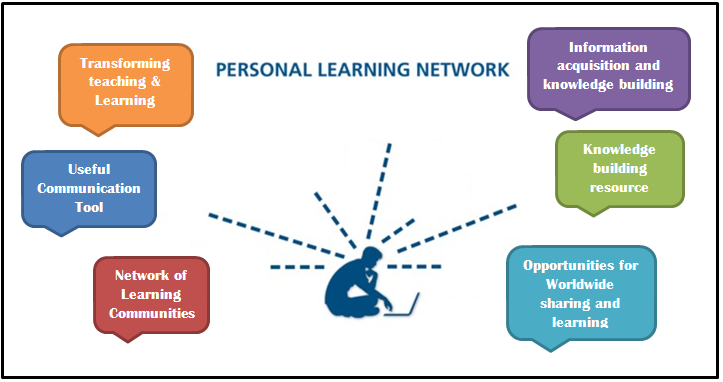
From the articles I learned that a personal learning network is a collection of information resources that a learner draws on to reach his/her learning goals.  On Pinterest it emphasizes that this network is free PD* 24/7. (*Professional Development)  I also learned that online social networks can be an important part of a personal learning network.  I  really enjoyed the example of the teacher who tweeted about a moment in her life and had students generate the questions that would apply to their learning.  Brilliant!  This a great way to engage students about their world, in their world-- giving them experiences with real life through their "tech" culture. 

To expand my PLN now I will continue to develop my Diigo account, which lets me save and organize bookmarks easily.  I have many bookmarks of resources that I plan to use or have used with my students.I have enjoyed all of the great resources shared in this UH MEd program, and I've started listing them in this blog for myself and others.  

I would say that I'll expand my PLN through Facebook and Twitter, but unfortunately this may be where I draw my digital immigrant line.  I have an aversion to social networks.  I check my Facebook irregularly and with great irritation.  I have no interest in a Twitter account, and it would take more persuasion than this article to get me there.  I enjoy Pinterest as long as it serves my specific goals.  I am just hesitant to sort through the "mosh pit of random thoughts and lackluster chitchat" of society in general (November, 2012).  But, I understand that our world is changing quickly and as PLN's evolve into filtered, professional resources and serve my educational needs, I will proceed with caution.  Maybe like Sam I Am I will learn to like things I'm uncomfortable with someday.

Here is a look at my current Professional/Personal Learning Network:

Monday, September 30, 2013

Assignment #4 - Action Research in Practice


image from http://postgrowth.org/wp-content/uploads/2013/08/action-research-image.png


Post:  What are the benefits of action research?  What experiences do you have conducting research that could help you in this process?  What questions do you have?

***********************

What is Action Research?
It seems to be natural and intuitive to see problems in one's practice and try to fix them.  People may conduct portions of action research without knowing it.  My definition of action research is implementing smart change.  It involves a process in which a teacher identifies a problem affecting her practice, investigates it, comes up with a plan to change it, tries out her plan, and evaluates how it went.  

Benefits of Action Research
Empowerment of participants, collaboration through participation, acquisition of knowledge, and social change are common themes of action research identified by Eileen Ferrance in her booklet "Action Research" (2000).  These four outcomes are also benefits of action research.

First, participants feel empowered because they are working on something they care about. Just as we encourage our students to investigate what interests them, teachers who care about an issue and want to do something about it will have intrinsic motivation.  Action research is usually not an assignment forced upon them. They are eager to do it because figuring it out will make their jobs and lives better.  

Second action research invites collaboration among teachers and administration.  Working together inspires collegiality within the school, and gathering concrete data together adds validity to their unified effort.

Acquisition of knowledge is another benefit.  Most teachers are naturally curious and love to learn.  They may feel excited about solving a problem.  Action research may confirm their theories, or they may discover something new.

Finally, and most importantly, action research leads to social change.  Action research is used in many fields, but in education, where children's lives, and our future is at stake, implementing smart change is crucial.  Improvement is always our goal, and action research is the plan to get us there.

Five Cyclical Phases of Inquiry
1. Identification of problem area
2. Collection and organization of data
3. Interpretation of data
4. Action based on data
5. Reflection


What experiences do you have conducting research that could help you in this process?

As teachers we are constantly involved in inquiry.  We identify problems, collect data, and take action.  The problem may concern the class, for example the class is unusually distracted at a certain time everyday.  Or the problem may be specific to a child, such as, Johnny still only knows 20 sight words after extensive practice.  

When I served as vice principal of our small school part of my job was to collect data to assess progress as a school, and students' individual progress.  Data can be collected in many ways, such as interviews, focus groups, assessments, and student work samples.

I have taught in many different situations.  I have taught different ages, subjects, in different locations, and with different goals.  The variety of my teaching experiences helps me to analyze what has worked in different situations and has led me to ask "Why?"  
These experiences could help me in the action research process because I can draw on a range of methods, activities, and ideas when acting on the data I've collected.